Yes. If you need to hand your account off to someone else, for example when the person who manages your SparkToro plan is leaving, the account owner can transfer ownership right from account settings.
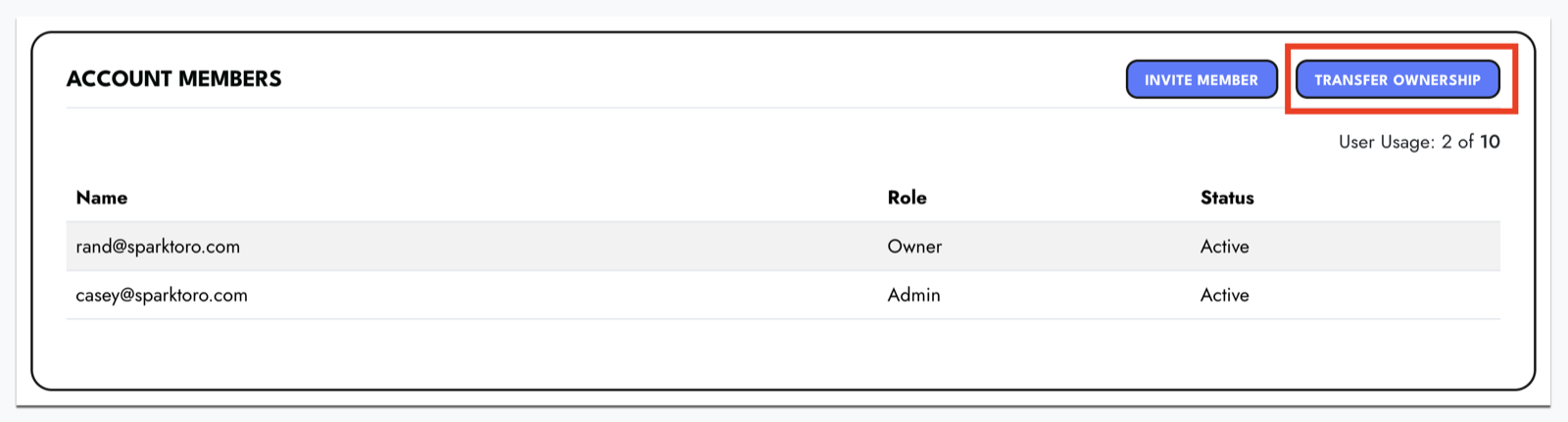
From your account settings, open the Account Members section and click Transfer Ownership. Only the current account owner sees this button.
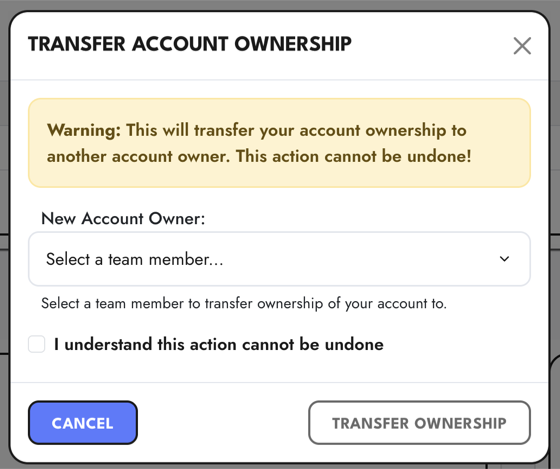
In the window that opens, choose the teammate who should become the new owner, check the box to confirm you understand the action can't be undone, and click Transfer Ownership. Once you do, they take over billing and account management, and you become a regular member of the account.
The person you transfer to needs to be:
- An existing member of your account, and
- The owner of their own separate SparkToro account that has no active paid subscription.
If someone isn't showing up as an option, it's usually because they don't yet meet those requirements. Have them join your account first if they aren't already a member.
A couple of related options that might be a better fit:
- You just want to give someone access without handing over the account. Add them as a collaborator on your paid plan. Everyone keeps their own login while sharing the plan's reports and folders.
- You're consolidating two accounts. See merging two SparkToro accounts.
If you run into any trouble, email support@sparktoro.com and we'll help.
